Monday, 28 May 2012


Logitech Mini Boombox review

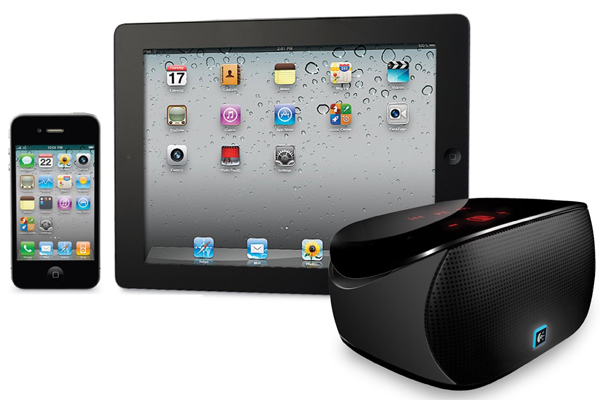
Logitech’s Wireless Boombox isn’t the most portable speaker around. But if you want to play music from your iPhone, iPad, or any other Bluetooth-enabled device, it’s something you can take around with you. It retails for $150 and had incredible sound quality. Mini Boombox is $50 cheaper and half the size of Boombox. It’ll fit easily on the top of your hand and charges with a mini-USB instead of a standard USB. But can it live up to the larger Boombox in terms of performance? Or is it just as small as its size?

Design

Mini Boombox measures only 4.55 x 2.8 x 2.28 inches and weighs only half a pound. It has rounded corners and doesn’t have physical buttons, save for the on/off switch at the back. The mini-USB charging port can also be found in the back along with an auxiliary input. When you turn it on, capacitive buttons will light up in red and can be used for controlling music playback. They’re not as reactive as physical buttons but when you press them, they work quite well. The capacitive buttons are to be used for going forward, back, playing, and pausing music. Unfortunately, they’re near invisible under direct sunlight.

Logitech-Mini-Boombox2

I’m pretty sure you’ll love the rubber bottom of Mini Boombox. Because of this design, it easily latches on to slippery surfaces – even your car’s dashboard – without an adhesive. It can stay put for hours at a time before needing any replacement. There’s also an indicator that will notify you of a low battery status. Sadly, there’s no way of knowing that it’s fully charged.
Logitech-Mini-Boombox3

Performance

It easily pairs with Bluetooth-enabled devices that support A2DP but you can also connect devices via its 3.5mm audio output. The iPad, iPhone 3G and later, and iPod Touch 2nd generation and later are among those listed to be compatible to it. What may come as a surprise is that it plays music just as loudly as its bigger brother. It’s something anyone won’t expect from a speaker of this size. The sound coming from its two 3W speakers will easily fill a small room – a performance we usually expect from larger speakers like Boombox and Jambox.

Logitech-Mini-Boombox4

Mini Boombox can never take the place of midrange to high-end speakers in terms of sound quality though you can use it as a speaker for your laptop; in case you decide to watch videos or play music from there. Even if you use it to play music outdoors, sound quality remains good. Battery performance is even more impressive than one would’ve imagined. Mini Boombox can last up to 10 hours of playback when fully charged.

Verdict

Mini Boombox is one of the greatest deals you’ll find when looking for an ultra-portable speaker that retails for $100 or less. It’s amazing how a small speaker such as this can deliver great sound quality. It’s the perfect gadget accessory for those who travel a lot and people who loved the performance of Boombox but aren’t as willing to shell out an additional $50.

Tuesday, 22 May 2012


Thunderbolt is the next-generation I/O interface that significantly boosts file transfer rates. With transfer rates of up to 10 Gbps, Intel says that it can transfer a full-length HD movie in less than 30 secs. Compare that to USB 2.0 and it is generations ahead in both read and write speeds. Asus today announced P8Z77-V Premium, a mainboard that supports the exact same high-speed interface. It is the first Intel-certified motherboard with Thunderbolt.
Thunderbolt is said to be two times faster than USB 3.0 and 20 times faster than USB 2.0 which remains to be the most widely used I/O technology across most devices. Each Thunderbolt port is capable of reading and writing 10 Gbps and up to six compatible devices can be connected to Asus P8Z77-V Premium. Fully display support with a monitor equipped with either DisplayPort or Thunderbolt is also made possible by a seventh port. But you won’t be limited to Thunderbolt with P8Z77-V Premium because it also includes half a dozen USB 2.0 and five USB 3.0 ports.

Hardware

Specifications
Asus P8Z77-V Premium Motherboard
Form factor ATX Form Factor, 12 x 9.6 in
CPU Intel socket 1155 for 3-rd/2-nd Generation Core i7/Core i5/Core i3/Pentium/Celeron Processors; Supports Intel 22nm, 32nm CPU and Turbo Boost Technology 2.0 depending on CPU types
Chipset Intel Z77
Memory 4 x DIMM, Max. 32GB, DDR3 1066/1333/1600/1800(OC)/1866(OC)/2000(OC)/2133(OC)/2200(OC)/2400(OC)/2600(OC)/2800(OC)
Non-ECC, Un-buffered Memory
Dual Channel Memory Architecture
Supports Intel Extreme Memory Profile (XMP)
*Hyper DIMM support varies depending on CPU
Graphic Integrated Graphics Processor Multi-VGA output support: HDMI/DisplayPort/Thunderbolt ports
Multi-GPU support Supports NVIDIA 4-Way SLI, AMD 4-Way CrossFireX, and LucidLogix Virtu MVP Technology
Expansion slots 4 x PCIe 3.0/2.0 x 16 slots 2 x PCIe 2.0 x 1 slots
Storage Intel Z77 chipset: 2x SATA 6Gbps ports
3x SATA 3Gbps ports
1x mini-SATA 3Gbps ports with on-board 32GB SSD
Support Raid 0, 1, 5, 10
Supports Intel Smart Response, Rapid Start, and Smart Connect Technology
Marvell PCIe 9230 controller:
4x SATA 6Gbps ports
Support Raid 0, 1, 10
ASMedia PCIe SATA controller:
2x eSATA 6Gbps
LAN Intel 82579V, 1x Gigabit LAN Controller Intel 82583, 1x Gigabit LAN Controller
Dual Gigabit LAN controllers
Intel LAN Dual interconnect between the integrated LAN controller and Physical Layer (PHY)
Wireless Data Network WiFi 802.11 a/b/g/n Supports dual bad frequency 2.4/5 GHz
Bluetooth Bluetooth 4.0, Bluetooth 3.0 + HS
USB ports ASMedia USB 3.0 controller: 2x USB 3.0 ports Intel Z77 chipset: 4x USB 3.0 ports or 6x USB 2.0 ports
Overclocking features ASUS CPR (CPU Parameter Recall)

Features

One feature of Asus P8Z77-V is multiple SSD caching for installing multiple SSDs without restrictions on capacity. The same feature also allows installation of different HDD/SDD combinations for optimum performance. The onboard 32GB mSATA SSD enables fast boot times and reduces resume times coming from sleep or hibernate. Smart DIGI+ technology boosts performance speeds by up to 85 percent but can also reduce CPU wattage at the same time, cutting it in half.
These are but a few of the many cool features of Asus P8Z77-V Premium. Other functions include real-time network bandwidth control, USB BIOS flashback, and faster USB 3.0 Transmission with UASP. The motherboard also supports ASUS Crystal Sound for an improved audio experience.

Saturday, 12 May 2012

At the peak of NVIDIA’s graphics cards is GK104, better known as Kepler or GTX 680. GeForce GTX 670 is still Kepler in its essence but with less power and a cheaper price. It rivals AMD Radeon HD 7950. NVIDIA claims it is more powerful than the best AMD processors and we are here to find that out.

Design

It’s rarely that we see top-tier graphics cards come in slim packages and GTX 670 is just that. It is compact and lightweight much like GTX 680. It measures only 7 inches long if we exclude the PCIe bracket. GeForce GTX 670 is equipped with one DisplayPort, one HDMI port, and two separate DVI outputs. Shown off during its unveiling is a dual-slot design but NVIDIA remarks some of their partners are opting for single-slot options.

Technically speaking, GTX 670 is GTX 680 because it uses the same GK104 chip. Unlike 680, it has one Streaming Multiprocessor (SM) unit turned off and reduced to 112 texture units from 128. It does keep the 32 ROPs of GTX 680, staying true to its roots.
Specs

GTX 670 has 12% less cores. 192 CUDA scores were nicked off, to be exact, in favor of the lower price point. It is also clocked at the lower 915MHz frequency making it 12% slower than GTX 680. These downgrades are minimal and keeps the graphics card on top-chart performance.
Performance

NVIDIA GeForce GTX 680 underwent preliminary benchmarks and was compared to GeForce GTX 580 and Radeon 7950. It was first tested with 3DMark7 to assess how it performed against its predecessor and rival.

Monday, 7 May 2012

PODCASTING ?!?

Someone please message me about podcasting what it is and how to start.

lewis2582@hotmail.co.uk

Sunday, 6 May 2012

Tegra 3 powered HTC One X vs HTC One S – which is better suited for your needs?


HTC One S and One X belong to the same line of smartphones. With that being said, they share similar designs and technologies. But there are enough differences between the two to make you wonder which is better suited for your needs. For instance, HTC One X is powered by Tegra 3 whereas One S is supported by the dual-core Snapdragon S4. And don’t be deceived by the midrange classification of HTC One S either. One might mistake it for a high-end phone with its 4.3” screen. And so, the war between quad-core Tegra 3 and dual-core Snapdragon S4 continues in this short review of HTC One X and One S.
Design
It only makes sense that HTC One X is larger and heavier with its 4.7” screen but HTC One S is surprisingly thinner, measuring only 0.31 inches. The difference in thickness is minimal but can be felt. The two have ceramic bodies, accounting for their light weight and durability. The polycarbonate material used in both phones have deep coloration. When scratched, the same color will show underneath so scratches are not clearly visible.
Curved corners and edges that taper towards the flat back make them comfortable to hold. The soft-touch feeling of their ceramic bodies adds comfort and gives you the same premium feeling that other HTC phones have. Their front panels are marked by three touch-sensitive buttons for navigation and on the back, they have rear cameras with slight variations in design.
Software
There isn’t any difference between the two in terms of software. The two run Android 4.0 Ice Cream Sandwich and have Sense 4 as their UI. Among the features of Sense 4 include landscape support for the home screen, an improved email client with threaded messages and layout changes, Smart Sync, full Dropbox integration, the Siri-like HTC Speak, and Guest Mode Scene, Beats Audio compatibility with third-party apps, option to remove ads in the browser using Reader feature, Read/Watch Later for viewing web pages even when offline, Guest Mode Scene for privacy, and general changes on user interface.
Hardware and features
Beginning with specs that are common to the two is an 8-megapixel camera with f/2.0 aperture, LED flash, and Backside Illuminated Sensor (BSI). Camera modes and features like autofocus, High Dynamic Range (HDR), and geo tagging found in both smartphones. Their rear cameras are capable of capturing 1080p videos at 29fps. Also integrated in both HTC One X and One S is a propriety HTC ImageChip DSP for image processing. 1GB RAM,Bluetooth 4.0, single micro USB 2.0 ports which can be used for HDMI, and lack support for expandable storage are three more relevant device specifications these two share.
HTC offers both phones with 50GB of cloud storage. You have no choice but to use micro SIM card with both HTC One S and One X. All other hardware and features vary.
An obvious difference can be noted on their screen size and display resolution. HTC One X is the larger one with its 4.7-inch screen. HTC One S is still sizable though and has a 4.3-inch form factor. As HTC’s flagship Android phone, One X has the better display offering 1280 x 720 pixels and 312ppi on its S-LCD 2 panel. HTC One S only has 960 x 540 pixels and 256ppi but makes up to these lacks by using a Super AMOLED panel for a high-contrast and vibrant display. Another advantage of HTC One X is the scratch-resistant glass protecting its LCD.
While both have front-facing cameras for video calls, the one on HTC One S only has VGA quality. The front shooter of HTC One X has a slightly higher resolution at 1.3MP. Not only that, HTC One X has a larger memory space with 32GB of internal storage. HTC One S limits you to just 16GB. In terms of connectivity, One X has broader support for WiFi networks (WiFi b/g/n/a). HTC One S can’t detect WiFi a networks.
A dual-core Snapdragon S4 powers HTC One S but it’s not to be loathed. 2 out of 3 benchmarks show it performs better than the quad-core Tegra 3 chip inside HTC One X. We often have the misconception that a phone needs more cores to be faster but it truly depends on manufacturers and how these processors are integrated it to work with a device’s software.
Verdict
The Tegra 3-powered variant of HTC One X is obviously the better choice but it’s not for everyone. We only suggest it to people after a massive 4.7-inch screen and need 32GB of internal storage. If you fancy Tegra-optimized games, One X is definitely worth it. But if you are easily satisfied with a 4.3-inc


Thursday, 3 May 2012

PICTURE

ONCE AGAIN SORRY ABOUT THE PICTURE PROBLEM

17.3-inch Series 7 Gamer hits US as the first Ivy Bridge powered laptop from Samsung


Samsung showed off a Sandy-based Chromebook last month and with the recently announced Ivy Bridge processor, we won’t be surprised to see them launch a version powered by the new processor. The US gets some luck today because Samsung Series 7 Gamer is now available in stores for $1,900. Though not a Chromebook, Series 7 Gamer is much more powerful and more suited for high-performance tasks like gaming.
Samsung Series 7 Gamer was first spotted at CES 2012 in marigold yellow. Just as its name suggests, the laptop is geared for the gaming industry. The laptop was initially released in Europe but Samsung decided to wait for Ivy Bridge before they launch it in the US. And this is why the gaming laptop is now available in US stores although stocks are limited to the black color option. The price is slightly higher than estimates from 4 months ago but this is only because it has better hardware. The Ivy Bridge CPU is just one of these upgrades.
The US version of Samsung Series 7 will be powered by a Core i7 CPU – specifically 3610QM. Behind its graphics performance is a non-Kepler discrete graphics card, NVIDIA GeForce GTX 675M with 2GB of video RAM. Without the 28nm Kepler architecture, this model is less efficient at handling power. Asus Zenbook UX32VD is an exception though. Even without a Kepler GPU this ultrabook is power-efficient.
Coming back to Series 7 Gamer, it has a 400-nit 17.3-inch display with 1080p resolution. The 1.5TB 7200RPM hard drive and 8GB flash memory contribute to the speedy boot times of Series 7 Gamer. Battery life is 3.7 hours at its best. Finally, it has 16GB RAM and gets a backlit keyboard.
Gaming laptop Samsung Series 7 Gamer is on sale beginning May 1 in single configuration. It is currently available at Amazon, CompUSA, Newegg, and TigerDirect for $1899.99.

Wednesday, 2 May 2012

Samsung’s new NX20, NX210 and NX1000 have attractive specs, look a lot like Sony’s NEX


Samsung is one of the fastest growing mobile companies in the world, but they’ve actually been pretty successful for the whole decade – they’re well known in Asia and Europe for their household electronics, and their LCD TVs and monitors are trusted all over the world. They also manufacture all sorts of computer hardware under their own brand and for other companies.
As of late, they’ve been getting into the digital camera market, and they’re actually pretty successful at it – their first models may have been simple point and shoot cameras for those on a budget, but the build quality and more importantly, picture quality, didn’t suffer because of that. Their ILC cameras, on the other hand, are specifically made for the high end market, costing a pretty penny, but also delivering all the features you’d expect from a professional mirrorless camera with a detachable lens.
This year, they’re bringing out a couple of new ILC’s – two upgrades for existing models and a new, budget ILC in the form of the NX20, NX210 and NX1000, respectively. The naming is slightly confusing, so let’s get this out of the way: the NX20 is the high end model, the NX210 is the mid-range and the NX1000 is the low-end/budget ILC – simple as that.
All three cameras are very well built, although the NX1000 is lighter and has a less premium feel to it – thankfully, that does not affect its functionality in any way. All three models have built-in Wifi for easy connectivity, which is pretty nice. Also, the cameras (especially the NX210 and NX1000) look a lot like Sony’s NEX line (even the name is similar) – hopefully, Sony doesn’t get offended.
The NX20 is obviously the model with the most features and functionality. For $1100 (which includes a 18-55mm f/3.5-5.6 lens), this camera gives you practically everything you may need to start shooting great photos AND video. The camera uses Samsung’s own 20.3 Megapixels APS-C CMOS sensor, which is pretty damn good at what it does – it can certainly compete with any other sensor on the market, especially in the same price range. Aside from the lens mount, the camera has an integrated EVF and a swivel 3.0 AMOLED display that is perfect for shooting photos and for monitoring video. The video capabilities are pretty good, too: Full HD is supported at 30 FPS, and there’s a special 2.35:1 format mode at 1920×810 pixels and 24 FPS, which many people might find useful.
The NX210, which will retail for $900, has most of the features of the NX20, except for the swivel display and integrated EVF. There’s also no integrated flash, however that is because there’s a standard hot shoe that you can use for other accessories, and a flash module comes in the package – I’d say that’s a good trade-off. The NX210 is clearly aimed at those who need a very compact ILC with as many features as possible – the camera has the same APS-C sensor as the NX20, with the only feature missing being the extra wide video format. Even the lens shipping with the camera is the same exact model.
And finally, the NX1000 – it’s almost like the NX210, but with several features missing in order to reduce the price. The sensor has been left intact, so you’ll get pretty much the same quality in photos and video as the NX20 and NX210, but the lens included in the package is now a 20-50mm f/3.5-5.6 unit, while the 3 inch screen has half the resolution and is now an LCD unit. There’s no word on the price, but if it’s $700 or less, this camera will be one of the best budget ILCs you can get.
All cameras will hit the stores in May-June this year, so it won’t be long until you can test them out for yourself.

Tuesday, 1 May 2012

GIVEAWAY!

OK so when i hit 1000 blog views ill do a giveaway

i want the views by the 18th.
sound fair?

the more i get by then the better the give away

also new blog tomorrow and video channel coming soon.